
Elevating Photorealism: Why Cat’s Eye Bokeh & Optical Vignetting Are Essential for After Effects Compositors

If you’ve spent any time working with 3D renders or digital footage in post-production, you know that standard blur filters rarely cut it when you need a realistic depth of field for After Effects. Real physical camera lenses don’t just evenly blur out-of-focus areas; they introduce subtle, highly complex optical quirks that our eyes instantly recognize – even if we don’t consciously realize it.
One of the most prominent (and frequently overlooked) natural lens phenomena is optical vignetting, commonly known as “Cat’s Eye Bokeh”. While built-in camera blurs in most software treat every out-of-focus highlight across the frame identically, real-world optics tell a completely different story.
In this article, we’ll explore what optical vignetting is, why it’s critical for convincing digital defocus, and how DOF PRO for After Effects stands alone as the only depth of field plugin capable of accurately reproducing this phenomenon.
What Is Optical Vignetting (“Cat’s Eye Bokeh”)?
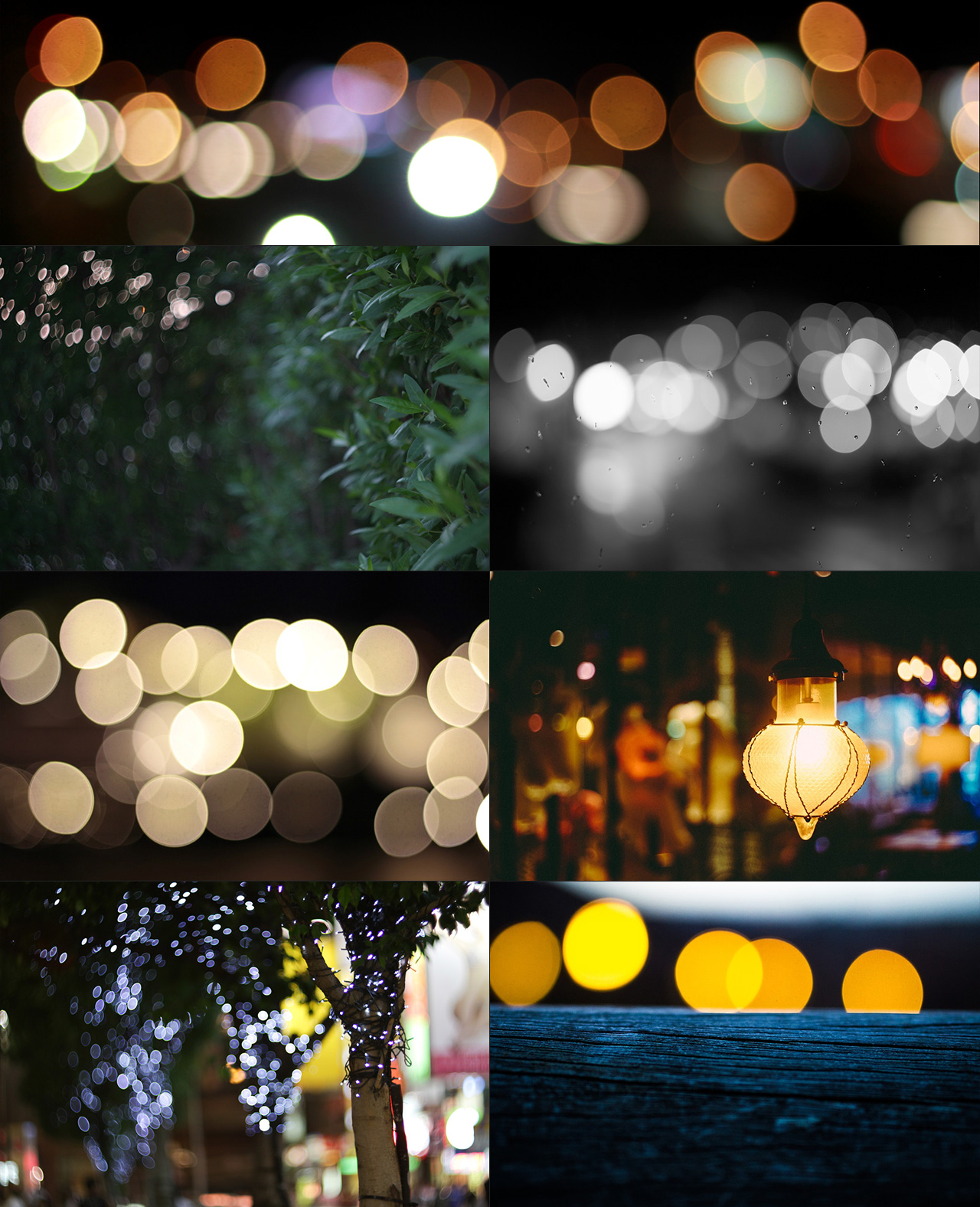
When light travels through a physical camera lens, it doesn’t just pass through a single flat opening. Lenses are made up of multiple glass elements housed inside a physical barrel.
- In the center of the frame, light passes straight through the aperture, producing circular or polygonal out-of-focus highlights (bokeh).
- Toward the edges of the frame, light enters the lens barrel at an extreme angle. The front and rear lens elements physically block or shadow part of the light path before it reaches the diaphragm.
Because the physical opening appears truncated or squeezed from off-axis angles, out-of-focus highlights near the edges of the image take on an almond or lenticular shape – resembling the slit eye of a cat.
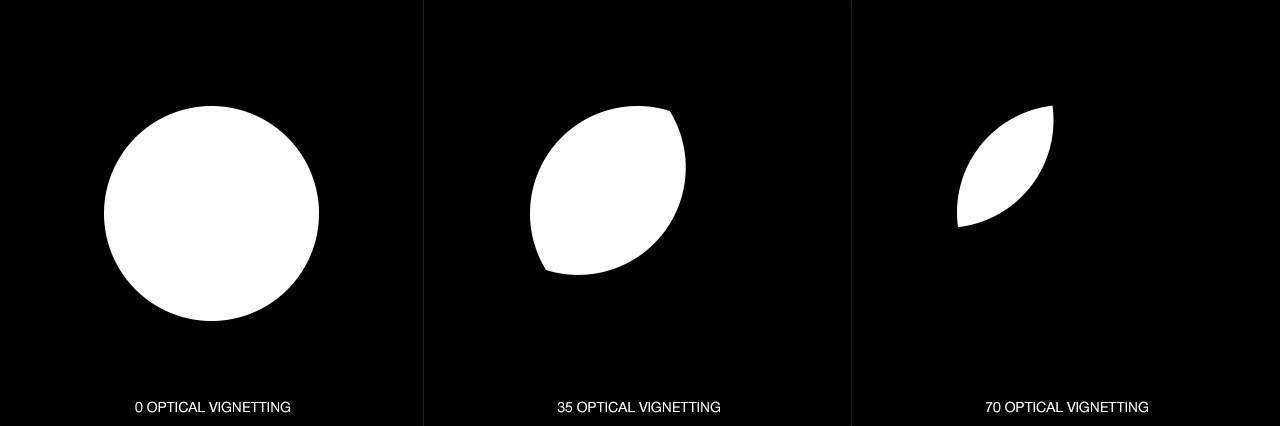
Center of Frame:  ( O )   <-- Perfect Circular / Polygonal Bokeh
Edges of Frame:   ( ( )   <-- Truncated "Cat's Eye" Optical Vignetting
This phenomenon occurs naturally in almost all wide-aperture camera lenses (especially vintage prime lenses and anamorphic glass). Without it, modern CG renders and digital composites look “flat,” sterile, and distinctly artificial.
Why Standard “Camera Lens Blur” Falls Short
If you’re relying on stock After Effects depth of field tools or generic After Effects plugins, you’ve likely noticed that out-of-focus highlights retain the exact same circular shape from the center of the screen all the way to the outer corners.
While traditional filters simply apply an image-wide defocus pattern based on a depth map, real optical physics cause the shape, intensity, and distortion of the aperture to change dynamically across the image plane.
To bridge the gap between CGI and live-action cinematography, a professional depth of field plugin for After Effects needs to simulate how light physically refracts and vignetting clips the bokeh field toward the periphery.
Why DOF PRO Is in a League of Its Own
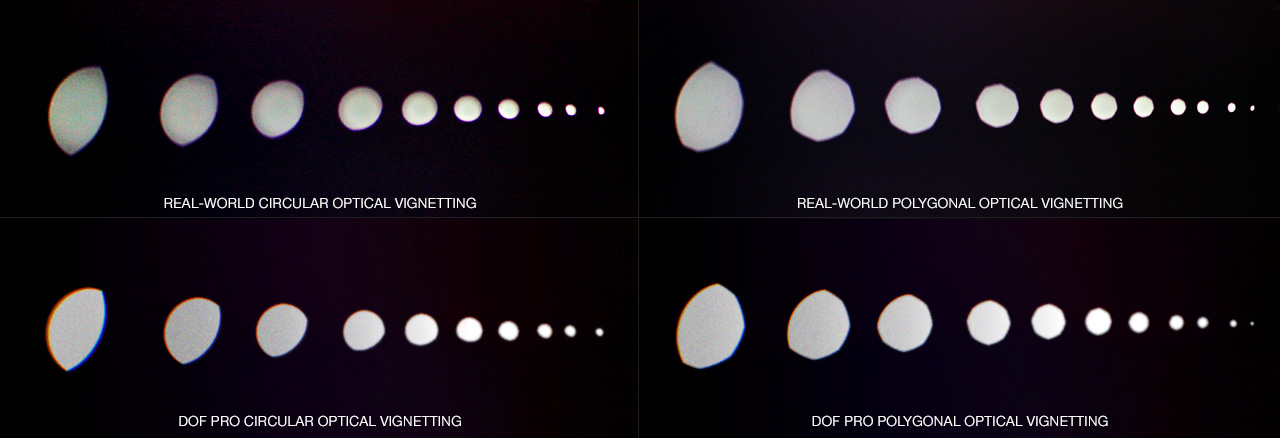
Developed by Richard Rosenman with over fifteen years of dedicated research and development, DOF PRO (Depth Of Field Generator PRO) is widely considered the industry benchmark for post-process bokeh and depth simulation.
What sets DOF PRO apart from every other tool on the market is its ability to handle ultra-complex physical lens behavior with point accuracy. DOF PRO is currently the only depth of field plugin for After Effects capable of true Optical Vignetting (Cat’s Eye Bokeh) with independent scale and falloff controls.
       ┌────────────────────────────────────────────────────────┐
       │   DOF PRO vs. Standard Camera Blur Engines             │
       ├──────────────────────────┬─────────────────────────────┤
       │ Feature                  │ Standard AE Lens Blur       │
       ├──────────────────────────┼─────────────────────────────┤
       │ Optical Vignetting       │ ❌ Uniform across frame     │
       │ Spherical Aberrations    │ ❌ Not supported            │
       │ Front/Back Differentiation│ ❌ Uniform focal behavior   │
       │ Custom Aperture Maps     │ ⚠️ Limited                 │
       └──────────────────────────┴─────────────────────────────┘
       ┌────────────────────────────────────────────────────────┐
       │ Feature                  │ DOF PRO for After Effects   │
       ├──────────────────────────┼─────────────────────────────┤
       │ Optical Vignetting       │ ✅ True Cat's Eye Scaling   │
       │ Spherical Aberrations    │ ✅ Positive & Negative      │
       │ Front/Back Differentiation│ ✅ Physically Accurate      │
       │ Custom Aperture Maps     │ ✅ Full Online Library      │
       └──────────────────────────┴─────────────────────────────┘
Key Optical Features in DOF PRO:

- Optical Vignetting (Cat’s Eye Control): Adjust vignette scale and intensity dynamically across the frame so out-of-focus highlights seamlessly shape into natural cat’s-eye slivers toward the edges.
- Spherical & Chromatic Aberrations: Simulate light refraction edge halos, core bright spots, and color fringing inherent to physical camera lenses.
- Front vs. Back Bokeh Differentiation: Automatically invert spherical aberration patterns depending on whether the subject is in front of or behind the focal plane – matching true optical physics.
- Blade Notching & Custom Apertures: Fine-tune blade counts (from 3 to 16 blades), adjust positive/negative blade notching, or load custom aperture maps directly from the Richard Rosenman Aperture Map Library.
How to Get Started

If you want to take your composite renders to the next level and achieve a truly realistic depth of field for After Effects, adding subtle optical vignetting is one of the quickest ways to elevate your visual effects workflow.
You can learn more, view side-by-side render comparisons, or try out a demo version directly on the DOF PRO for After Effects product page.