
Streamline Procedural Motion Graphics: Meet the New Path Scatter Plugin for After Effects
Animating repeating elements along complex splines has traditionally been one of the most tedious hurdles in motion design. Manually staggering layers, syncing sub-comp animations, and wrestling with orient-to-path expressions often leads to cluttered timelines, sluggish viewport previews, and creative roadblocks.

Renowned digital artist and tools developer Richard Rosenman has officially launched Path Scatter, an advanced After Effects plugin and dedicated sprite animation engine designed to scatter, deform, and animate multi-layer instances along vector paths with effortless procedural control.
What Is Path Scatter?
At its core, Path Scatter is a dynamic path-targeted animation tool for Adobe After Effects. It allows artists to distribute up to 1,000,000 layer instances along any mask spline or vector path within a single effect control panel.
Rather than duplicating dozens of composition layers, Path Scatter handles cloning, spatial orientation, internal time offsets, and multi-threaded rendering dynamically behind the scenes. Whether you are generating swarms of flying creatures, winding botanical growth, dense crowds, abstract HUD telemetry, or busy multi-lane traffic systems, you can drive the entire composition using a single Evolution slider.
Key Features & Motion Design Workflow
1. Multi-Layer Sampling with Custom Frequency Controls
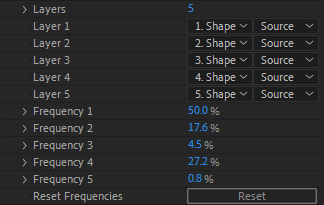
Most After Effects cloner plugins limit artists to a single source layer. Path Scatter allows you to assign up to five unique source layers simultaneously.
To give artists precise creative direction over distribution, the plugin features an integrated Frequency Distribution System. You can define the exact appearance probability of each sprite – such as scattering dense foliage at an 80% ratio while peppering rare flowering blossoms at 5% along the same spline.
2. Deep Procedural Randomization
Path Scatter eliminates repetitive, artificial-looking cloned patterns through granular transformation offsets:
- Transform Jitter: Inject randomized variance across scale, 2D rotation, opacity, and anchor points (X and Y).
- Axis Flipping: Dynamically flip sprites across X, Y, or both axes to maximize visual variety.
- Internal Time Offsets: Keep internal nested animations from playing in lockstep. Adding time offset randomness ensures a flock of animated birds flaps wings asynchronously.
3. Comprehensive Path Mechanics & Traffic Modes
- Auto-Orientation: Sprites naturally hug and align to the curvature of your paths throughout their journey.
- Bidirectional Movement: Simulate opposing flows of motion – ideal for two-way highway traffic simulations or counter-directional particulate streams.
- Multiple Mask Support: Target individual paths or iterate across every mask on a layer sequentially or concurrently using Incremental or Constant distribution modes.
4. High-Performance Architecture
Large procedural motion graphic setups can quickly bog down standard AE timelines. Path Scatter is engineered from the ground up for modern VFX workflows:
- Multi-Frame Rendering (MFR) Support: Takes full advantage of Adobe’s parallel-frame CPU rendering pipeline.
- 100% Multi-Threaded: Scales across an unlimited number of processor cores.
- Deep Color Pipelines: Native support for both 8-bpc and 16-bpc color depths.
How It Fits into Richard Rosenman’s Motion Graphics Ecosystem
Path Scatter joins a versatile suite of specialized After Effects plugins created by Richard Rosenman, each addressing specific VFX, motion design, and compositing challenges:
| Plugin | Primary Use Case |
| Path Scatter | Multi-layer procedural sprite duplication and animation along splines |
| Path Animator | Fast vector and mask-based stroke tracing and motion generation |
| Rope Sim | Physics-driven 2D rope, cable, and spline dynamics |
| DOF PRO | Industry-standard optical depth-of-field and bokeh simulation |
| Particle Projection | 3D planar projection and spatial particle array rendering |
| Motion Mosaic | Procedural grid-based tile animation and asset distribution |
If your projects frequently incorporate procedural splines, pairing Path Scatter with Path Animator and Rope Sim provides a comprehensive toolset for cable dynamics, organic vines, and intricate spline motion graphics without ever switching to an external 3D package.
Pricing & Availability
Path Scatter 1.0 is available now for Windows (Adobe After Effects compatible) as a commercial release.
You can read the full documentation, view demo reels, and download the plugin directly from the official product page: